Missing Strings (UI_PEACOCK)
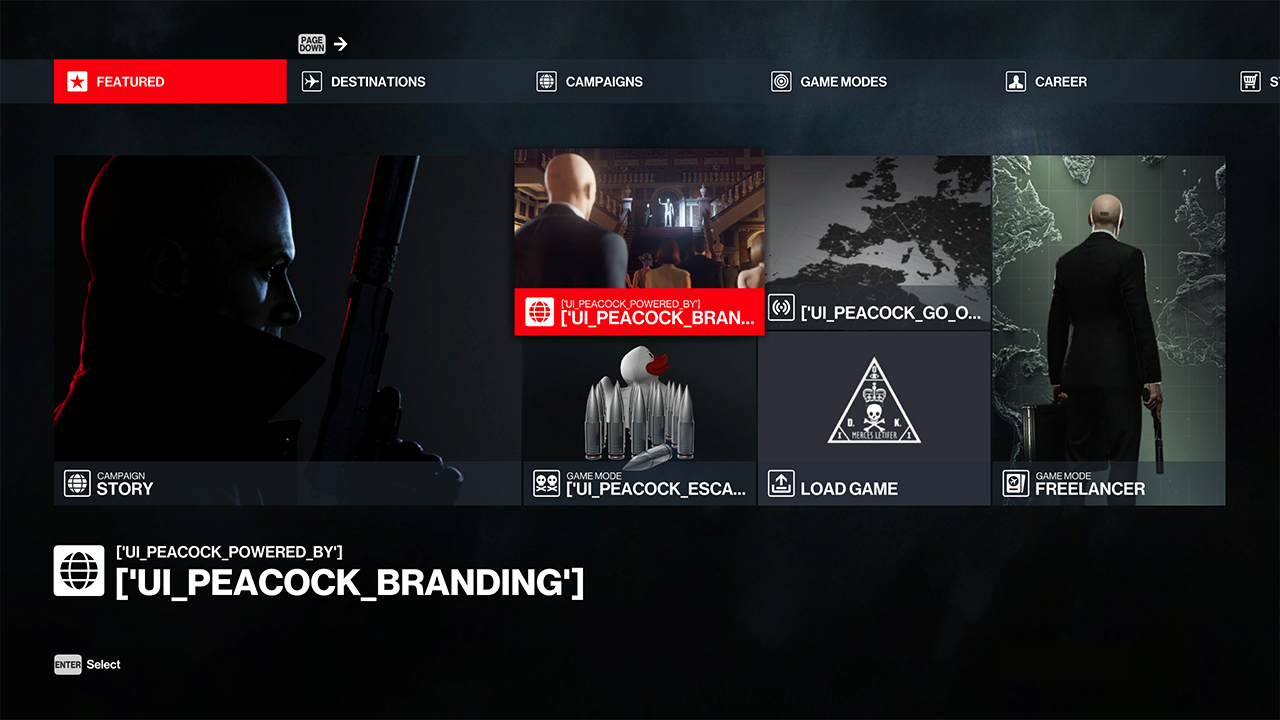
This is caused by the dynamic resources package not being downloaded from Peacock.
Mods can disable downloading this to allow their weapon (or other repository edits) changes to show on official via a thumbs command. But this also stops Peacock's dynamic resources package from being downloaded, this only contains a localisation file for Peacock's custom content.
You can identify it by the text of custom Peacock menu elements showing text starting with ['UI_PEACOCK as shown in the image.
How to fix
If you do not use Simple Mod Framework or you are using Hitman 2016 or 2.
Ensure that your thumbs.dat file does not disable the dynamic resources package through a console command.
If you are unsure how to check this, you can verify your game files to ensure you have the vanilla version.
Install the Peacock Strings mod using Simple Mod Framework to fix this issue.
Download the mod either
- Using this smf install link;
- Or download it from GitHub and add it through the mod manager.
Don't forget to re-apply your mods.
Ensure it is updated! You can do this through Simple Mod Framework's mod manager.